When configuring the repository in dbt, GitLab automatically:
Registers a webhook that triggers pipeline jobs in dbt.
Creates a project access token in your GitLab repository, which sends the job run status back to GitLab using the dbt API for CI jobs. dbt automatically refreshes this token for you.
Before you can work with GitLab repositories in dbt, you’ll need to connect your GitLab account to your user profile. This allows dbt to authenticate your actions when interacting with Git repositories. Make sure to read the requirements and limitations of the Starter and Developer plans before you connect your account.
To connect your GitLab account:
From dbt, click on your account name in the left-side menu and select Account settings.
Select Personal profile under the Your profile section.
Go to Linked accounts.
Click Link to the right of your GitLab account.
In GitLab, sign in if prompted. When an authorization prompt appears, select the option to authorize dbt.
After you authorize the request, you’ll be redirected back to dbt, and you'll see that your account has been linked to your profile.
dbt Starter and Developer plans use a single GitLab deploy token created by the first user who connects the repository, which means:
All repositories that users access from the dbt platform must belong to a GitLab group.
All Git operations (like commits and pushes) from the Studio IDE appear as coming from the same deploy token.
GitLab push rules may reject pushes made through dbt, particularly when multiple users are committing via the same deploy token.
To support advanced Git workflows and multi-user commit behavior, upgrade to the Enterprise plan, which provides more flexible Git authentication strategies.
dbt Enterprise and Enterprise+ customers have the added benefit of bringing their own GitLab OAuth application to dbt. This tier benefits from extra security, as dbt will:
Enforce user authorization with OAuth.
Carry GitLab's user repository permissions (read/write access) through to dbt or dbt CLI git actions.
In order to connect GitLab in dbt, a GitLab account admin must:
To create a group-owned OAuth application in GitLab:
In GitLab, navigate to your group settings and select Applications.
GitLab application navigation
When creating your group application, enter the following:
Field
Value
Name
dbt
Redirect URI
https://YOUR_ACCESS_URL/complete/gitlab
Confidential
✅
Scopes
✅ api
Loading table...
For the Redirect URI field, replace YOUR_ACCESS_URL with the appropriate Access URL for your region and plan.
Click Save application. GitLab will generate an Application ID and Secret. These values remain available even if you close the app screen, so you can return to save them later.
If you're a Business Critical customer using IP restrictions, ensure you've added the appropriate GitLab CIDRs to your IP restriction rules, or else the GitLab connection will fail.
After you've created your GitLab application, add it to dbt:
In dbt, go to Account settings > Integrations, then expand the GitLab section.
Enter the following values:
Field
Value
GitLab Instance
https://gitlab.com
Application ID
copy value from GitLab app
Secret
copy value from GitLab app
Loading table...
If you use a self-hosted GitLab instance, set GitLab Instance to your organization’s GitLab hostname (for example, https://gitlab.yourgreatcompany.com).
Click Save.
You will then be redirected to GitLab and prompted to sign in.
When an authorization prompt appears, select the option to authorize dbt.
After you authorize the request, you’ll be redirected back to dbt. Your integration is now ready for developers on your team to personally authenticate with GitLab.
dbt developers on the Enterprise or Enterprise+ plan must each connect their GitLab profiles to dbt, as every developer's read/write access for the dbt repo is checked in the Studio IDE or dbt CLI.
To connect a personal GitLab account:
From dbt, click on your account name in the left-side menu and select Account settings.
Select Personal profile under the Your profile section.
Go to Linked accounts.
If your GitLab account is not connected, you’ll see "No connected account". Select Link to begin the setup process.
In GitLab, sign in if prompted. When an authorization prompt appears, select the option to authorize dbt.
Once you approve authorization, you will be redirected to dbt, and you should see your connected account. You're now ready to start developing in the Studio IDE or dbt CLI.
When you connect dbt to a GitLab repository, GitLab automatically registers a webhook in the background, viewable under the repository settings. This webhook is also used to trigger CI jobs when you push to the repository.
If you're unable to trigger a CI job, this usually indicates that the webhook registration is missing or incorrect.
To resolve this issue, navigate to the repository settings in GitLab and view the webhook registrations by navigating to GitLab --> Settings --> Webhooks.
Some things to check:
The webhook registration is enabled in GitLab.
The webhook registration is configured with the correct URL and secret.
If you're still experiencing this issue, reach out to the Support team at support@getdbt.com and we'll be happy to help!
Errors importing a repository on dbt project set up
If you don't see your repository listed, double-check that:
Your repository is in a Gitlab group you have access to. dbt will not read repos associated with a user.
If you do see your repository listed, but are unable to import the repository successfully, double-check that:
You are a maintainer of that repository. Only users with maintainer permissions can set up repository connections.
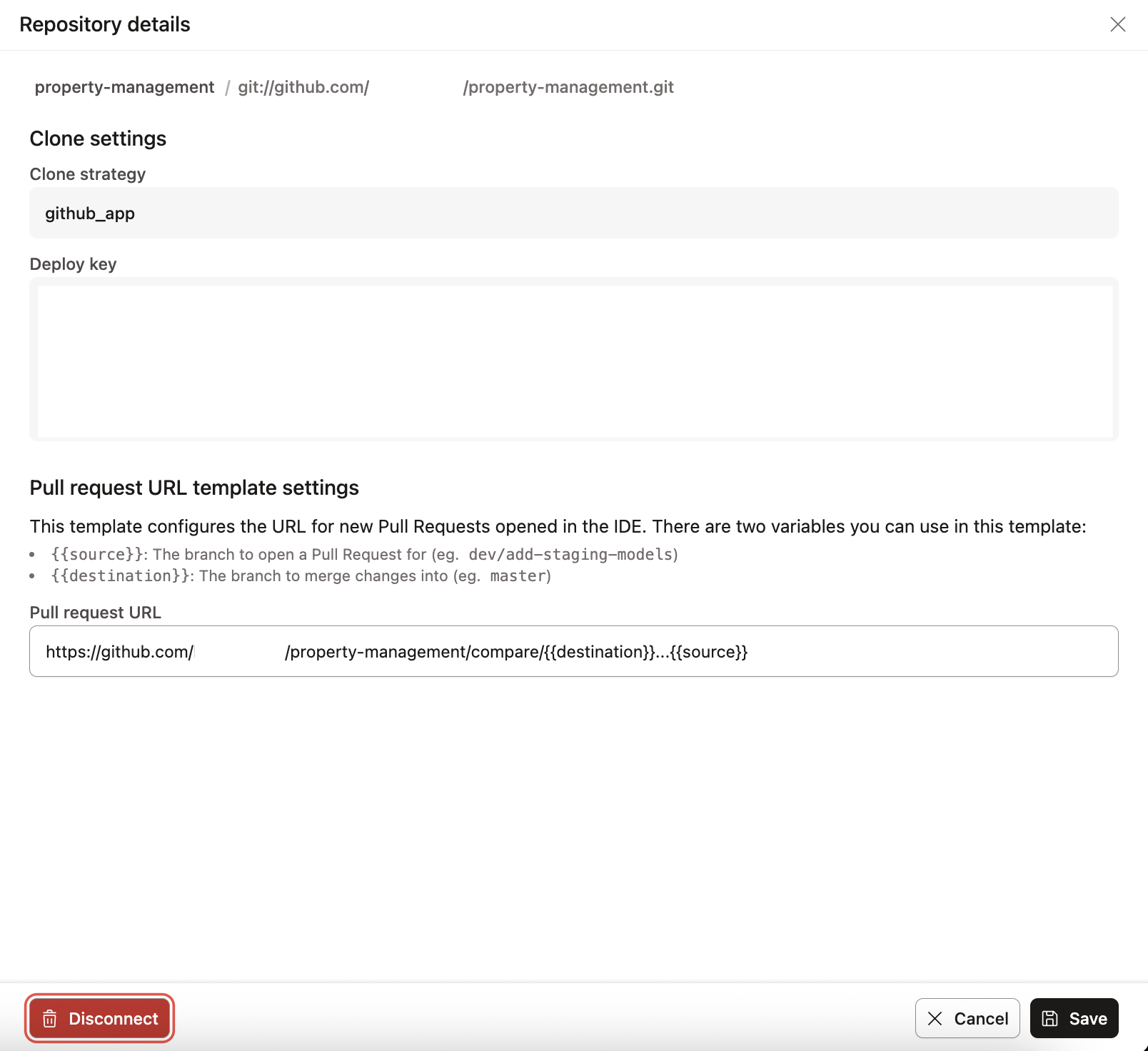
If you imported a repository using the dbt native integration with GitLab, you should be able to see if the clone strategy is using a deploy_token. If it's relying on an SSH key, this means the repository was not set up using the native GitLab integration, but rather using the generic git clone option. The repository must be reconnected in order to get the benefits described above.
How can I fix my .gitignore file?
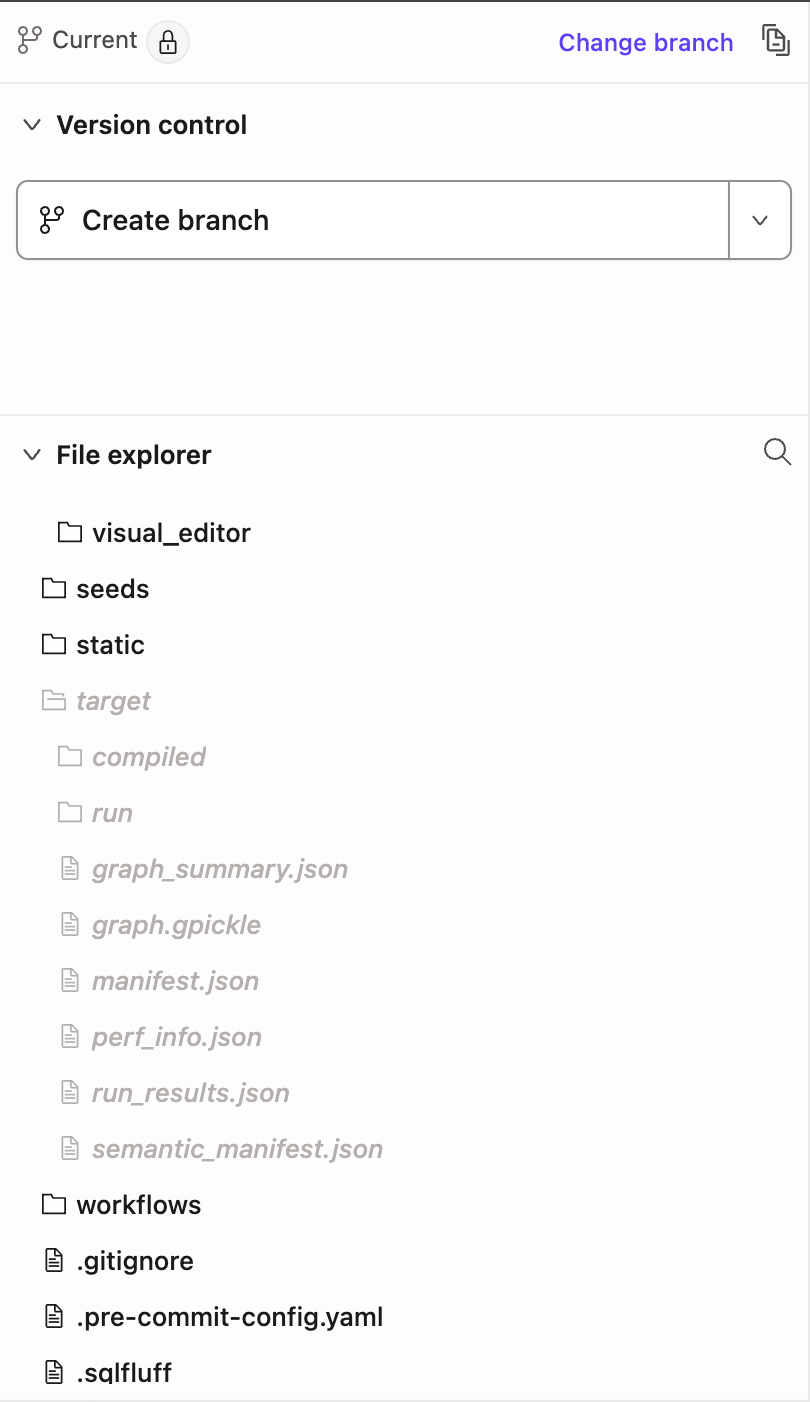
A .gitignore file specifies which files git should intentionally ignore or 'untrack'. dbt indicates untracked files in the project file explorer pane by putting the file or folder name in italics.
If you encounter issues like problems reverting changes, checking out or creating a new branch, or not being prompted to open a pull request after a commit in the Studio IDE — this usually indicates a problem with the .gitignore file. The file may be missing or lacks the required entries for dbt to work correctly.
The following sections describe how to fix the .gitignore file in:
Fix in the Studio IDE
To resolve issues with your gitignore file, adding the correct entries won't automatically remove (or 'untrack') files or folders that have already been tracked by git. The updated gitignore will only prevent new files or folders from being tracked. So you'll need to first fix the gitignore file, then perform some additional git operations to untrack any incorrect files or folders.
Launch the Studio IDE into the project that is being fixed, by selecting Develop on the menu bar.
In your File Explorer, check to see if a .gitignore file exists at the root of your dbt project folder. If it doesn't exist, create a new file.
Open the new or existing gitignore file, and add the following:
# ✅ Correct
target/
dbt_packages/
logs/
# legacy -- renamed to dbt_packages in dbt v1
dbt_modules/
Note — You can place these lines anywhere in the file, as long as they're on separate lines. The lines shown are wildcards that will include all nested files and folders. Avoid adding a trailing '*' to the lines, such as target/*.
For more info on gitignore syntax, refer to the Git docs.
Save the changes but don't commit.
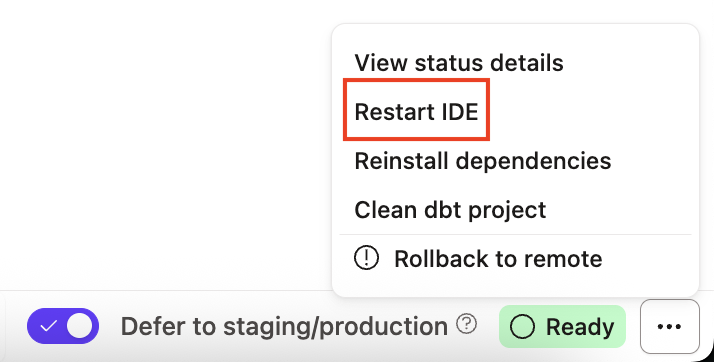
Restart the IDE by clicking on the three dots next to the IDE Status button on the lower right corner of the IDE screen and select Restart IDE.
Restart the IDE by clicking the three dots on the lower right or click on the Status bar
Once the Studio IDE restarts, go to the File Catalog to delete the following files or folders (if they exist). No data will be lost:
target, dbt_modules, dbt_packages, logs
Save and then Commit and sync the changes.
Restart the Studio IDE again using the same procedure as step 5.
Once the Studio IDE restarts, use the Create a pull request (PR) button under the Version Control menu to start the process of integrating the changes.
When the git provider's website opens to a page with the new PR, follow the necessary steps to complete and merge the PR into the main branch of that repository.
Note — The 'main' branch might also be called 'master', 'dev', 'qa', 'prod', or something else depending on the organizational naming conventions. The goal is to merge these changes into the root branch that all other development branches are created from.
Return to the Studio IDE and use the Change Branch button, to switch to the main branch of the project.
Once the branch has changed, click the Pull from remote button to pull in all the changes.
Verify the changes by making sure the files/folders in the .gitignore file are in italics.
A dbt project on the main branch that has properly configured gitignore folders (highlighted in italics).
Fix in the Git provider
Sometimes it's necessary to use the git providers web interface to fix a broken .gitignore file. Although the specific steps may vary across providers, the general process remains the same.
There are two options for this approach: editing the main branch directly if allowed, or creating a pull request to implement the changes if required:
Edit in main branch
Unable to edit main branch
When permissions allow it, it's possible to edit the .gitignore directly on the main branch of your repo. Here are the following steps:
Go to your repository's web interface.
Switch to the main branch and the root directory of your dbt project.
Find the .gitignore file. Create a blank one if it doesn't exist.
Edit the file in the web interface, adding the following entries:
target/
dbt_packages/
logs/
# legacy -- renamed to dbt_packages in dbt v1
dbt_modules/
Commit (save) the file.
Delete the following folders from the dbt project root, if they exist. No data or code will be lost:
target, dbt_modules, dbt_packages, logs
Commit (save) the deletions to the main branch.
Switch to the Studio IDE , and open the project that you're fixing.
Rollback your repo to remote in the IDE by clicking on the three dots next to the IDE Status button on the lower right corner of the IDE screen, then select Rollback to remote.
Note — Rollback to remote resets your repo back to an earlier clone from your remote. Any saved but uncommitted changes will be lost, so make sure you copy any modified code that you want to keep in a temporary location outside of dbt.
Once you rollback to remote, open the .gitignore file in the branch you're working in. If the new changes aren't included, you'll need to merge the latest commits from the main branch into your working branch.
Go to the File Explorer to verify the .gitignore file contains the correct entries and make sure the untracked files/folders in the .gitignore file are in italics.
Great job 🎉! You've configured the .gitignore correctly and can continue with your development!
If you can't edit the .gitignore directly on the main branch of your repo, follow these steps:
Go to your repository's web interface.
Switch to an existing development branch, or create a new branch just for these changes (This is often faster and cleaner).
Find the .gitignore file. Create a blank one if it doesn't exist.
Edit the file in the web interface, adding the following entries:
target/
dbt_packages/
logs/
# legacy -- renamed to dbt_packages in dbt v1
dbt_modules/
Commit (save) the file.
Delete the following folders from the dbt project root, if they exist. No data or code will be lost:
target, dbt_modules, dbt_packages, logs
Commit (save) the deleted folders.
Open a merge request using the git provider web interface. The merge request should attempt to merge the changes into the 'main' branch that all development branches are created from.
Follow the necessary procedures to get the branch approved and merged into the 'main' branch. You can delete the branch after the merge is complete.
Once the merge is complete, go back to the Studio IDE, and open the project that you're fixing.
Rollback your repo to remote in the Studio IDE by clicking on the three dots next to the Studio IDE Status button on the lower right corner of the Studio IDE screen, then select Rollback to remote.
Note — Rollback to remote resets your repo back to an earlier clone from your remote. Any saved but uncommitted changes will be lost, so make sure you copy any modified code that you want to keep in a temporary location outside of dbt.
Once you rollback to remote, open the .gitignore file in the branch you're working in. If the new changes aren't included, you'll need to merge the latest commits from the main branch into your working branch.
Go to the File Explorer to verify the .gitignore file contains the correct entries and make sure the untracked files/folders in the .gitignore file are in italics.
Great job 🎉! You've configured the .gitignore correctly and can continue with your development!
For more info, refer to this detailed video for additional guidance.
I'm seeing a Gitlab authentication out of date error loop
If you're seeing a 'GitLab Authentication is out of date' 500 server error page - this usually occurs when the deploy key in the repository settings in both dbt and GitLab do not match.
No worries - this is a current issue the dbt Labs team is working on and we have a few workarounds for you to try:
Under Repository Settings, manually add to your Gitlab project deploy key repo (with Grant write permissions box checked).
Go back to dbt, refresh your page and try developing again.
If you've tried the workarounds above and are still experiencing this behavior - reach out to the Support team at support@getdbt.com and we'll be happy to help!
Can self-hosted GitLab instances only be connected via dbt Enterprise plans?
Presently yes, this is only available to Enterprise users. This is because of the way you have to set up the GitLab app redirect URL for auth, which can only be customized if you're a user on an Enterprise plan.
Check out our pricing page for more information or feel free to contact us to build your Enterprise pricing.
How to migrate git providers
To migrate from one git provider to another, refer to the following steps to avoid minimal disruption:
Outside of dbt, you'll need to import your existing repository into your new provider. By default, connecting your repository in one account won't automatically disconnected it from another account.
As an example, if you're migrating from GitHub to Azure DevOps, you'll need to import your existing repository (GitHub) into your new Git provider (Azure DevOps). For detailed steps on how to do this, refer to your Git provider's documentation (Such as GitHub, GitLab, Azure DevOps)
Disconnect the old repository in dbt by going to Account Settings and then Projects.
Click on the Repository link, then click Edit and Disconnect.
Disconnect and reconnect your Git repository in your dbt Account settings page.
Click Confirm Disconnect.
On the same page, connect to the new Git provider repository by clicking Configure Repository
If you're using the native integration, you may need to OAuth to it.
That's it, you should now be connected to the new Git provider! 🎉
Note — As a tip, we recommend you refresh your page and Studio IDE before performing any actions.
GitLab token refresh message
When you connect dbt to a GitLab repository, GitLab automatically creates a project access token in your GitLab repository in the background. This sends the job run status back to Gitlab using the dbt API for CI jobs.
By default, the project access token follows a naming pattern: dbt token for GitLab project: <project_id>. If you have multiple tokens in your repository, look for one that follows this pattern to identify the correct token used by dbt.
If you're receiving a "Refresh token" message, don't worry — dbt automatically refreshes this project access token for you, which means you never have to manually rotate it.
If you still experience any token refresh errors, please try disconnecting and reconnecting the repository in your dbt project to refresh the token.
For any issues, please reach out to the Support team at support@getdbt.com and we'll be happy to help!
 GitLab application navigation